





A leading North American tour operator received more than 30,000 invoices a year, many by fax or in handwriting. Here is how our AI invoice OCR development team automated data entry, reduced resources and reached 99.9% accurate billing.
Client
American Tours, a leading tour operator in North America
Industry
Travel and tourism (tour operator)
Services
AI-powered OCR invoice processing, automatic accounting system entry, deep learning for rejected invoices
Scope
30,000+ invoices a year, most received by fax, including handwritten documents
Headline result
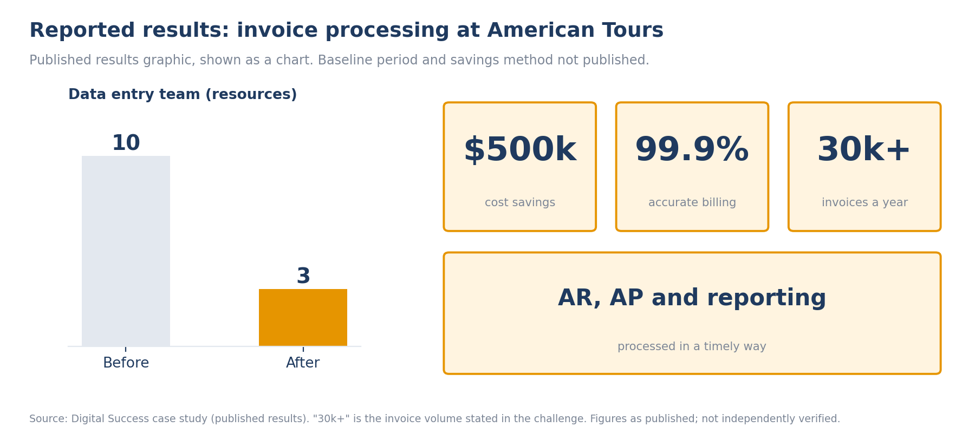
Team reduced from 10 to 3 resources, $500k cost savings, 99.9% accurate billing
Digital Success built an OCR solution with an AI-powered invoice specialist that scans invoices automatically, forwards them to a shared drive or an email, and enters the extracted data into the accounting system. Rejected invoices go to manual entry and deep learning. Digital Success reports a team reduced from 10 to 3 resources, $500k in cost savings and 99.9% accurate billing.
10 to 3
data entry resources after automation (published result)
$500k
cost savings (published result)
The challenge: 30,000 invoices a year, most of them faxes
American Tours receives more than 30,000 invoices a year that have to be entered into its accounting system. Most arrive by fax, and some are handwritten. The client had hired a team of more than 10 people for data entry, yet payments were delayed, accounting entries were inaccurate and reporting was a struggle.
Our AI invoice processing approach: scan, extract, post and learn
Digital Success built an OCR solution with an AI-powered invoice specialist. Invoices are scanned automatically and forwarded to a shared drive or an email, the extracted data is entered into the accounting system automatically, and rejected invoices are sent for manual entry and for deep learning.
| Workstream | What we did |
|---|---|
| OCR scanning | High-accuracy OCR scanning solution; the page states 99.9% accuracy. |
| Capture and routing | Invoices scanned automatically and forwarded to a shared drive or an email. |
| File formats | Recognition of multiple file formats. |
| Accounting entry | Extracted data entered into the accounting system automatically. |
| Exceptions and learning | Rejected invoices sent for manual entry and for deep learning. |
| Indexing | Digitized files indexed with metadata for faster search results. |
| Resourcing | Drastically reduced number of resources. |
The results: 10 to 3 resources, $500k savings and 99.9% accurate billing
Digital Success reports that the data entry team was reduced from 10 to 3 resources, that the client saved $500k, that billing is 99.9% accurate and that accounts receivable, accounts payable and reporting are now processed in a timely way.
Source note. The figures are those Digital Success publishes in the results graphic on its case study page. The baseline, time period and the method behind the $500k savings are not published. The page cites 99.9% both as OCR scanning accuracy (solution breakdown) and as accurate billing (results), and does not say how either was measured.
How to read the sections that follow. Each section carries a tag. Campaign evidence means activities and results documented in this engagement. Industry context and recommended practice are general guidance from Digital Success; they were not measured in this campaign and are not results.
Why Invoice Automation Is Different for Tour Operators
INDUSTRY CONTEXT + CAMPAIGN EVIDENCE
Tour operators pay a long list of suppliers, including hotels, transport companies and attractions. Those suppliers send invoices in every format, and smaller vendors often still use fax or handwritten paperwork. Volume can also swing with travel seasons, which makes a fixed data entry team either overstretched or underused.
The consequences reach beyond the finance team. Late payments can strain supplier relationships, and inaccurate entries flow straight into reporting. American Tours' documented problems, delayed payments, inaccurate entries and reporting challenges, match that pattern, and the solution targeted the data capture step that caused them.
Still keying in invoices by hand?
Get a review of your invoice formats, volumes and exception rates, and see where automation would remove the most manual work.
AI Invoice OCR Development: Capture, Extraction, Posting and Exceptions
CAMPAIGN EVIDENCE + RECOMMENDED PRACTICE
Documented: invoices are scanned automatically and forwarded to a shared drive or an email; extracted data is entered into the accounting system automatically; rejected invoices go to manual entry and deep learning; digitized files are indexed with metadata; multiple file formats are recognized.
Recommended practices for AI invoice processing projects:
- Test on your worst documents first.Faxed and handwritten invoices are the hardest cases. Evaluate accuracy on real samples, not clean PDFs.
- Plan the exception path.Route low-confidence documents to a person and feed the corrections back so the model improves.
- Index at ingestion.Capture vendor, date and amount as metadata so files can be found without opening them.
- Integrate, do not just export.Posting data directly into the accounting system removes the re-keying step that causes errors.
- Measure accuracy by field.Document-level accuracy can hide errors in amounts or dates, which are the fields that matter most.
- Protect financial data.Apply access controls and retention rules to scanned invoices. This is general guidance, not legal advice.
FROM FAX TO FINANCE
Turn a mountain of paper into posted entries.
Share a sample batch of your invoices and we will show what an OCR and AI workflow could read, route and flag.
What Other Finance Teams Can Learn From This Campaign
CAMPAIGN EVIDENCE, THEN RECOMMENDED APPLICATION
| Lesson | What happened here (documented) | How to apply it (recommended) |
|---|---|---|
| Centralize intake | Invoices were scanned and forwarded to a shared drive or an email | Bring every channel into one intake point before automating downstream steps |
| Close the loop | Extracted data was entered into the accounting system automatically | Integrate with the ledger so no one re-keys data |
| Design for exceptions | Rejected invoices went to manual entry and deep learning | Keep a review queue and use corrections to train the model |
| Make files findable | Digitized files were indexed with metadata | Add searchable fields at the moment of capture |
LEARN FROM EVERY EXCEPTION
Let every rejected invoice make the system smarter.
Deep learning on corrected documents is how accuracy keeps improving. Ask how we would set up that feedback loop for your invoices.
Key takeaways for AI invoice processing
- Automation shrinks the data entry bottleneck.The team went from 10 resources to 3.
- Accuracy comes from capture plus exceptions.OCR reads most documents and a deep learning loop handles the rest.
- Measure the whole workflow.Touchless rate and cycle time complete the picture that headcount and savings start.
Frequently Asked Questions
AI invoice processing uses OCR and machine learning to read invoices, extract fields such as vendor, date and amount, and post them to an accounting system. For American Tours it covered automatic scanning, routing, data entry and deep learning for rejected invoices.
Digital Success reports the data entry team was reduced from 10 to 3 resources, $500k in cost savings and 99.9% accurate billing, with timely processing of accounts receivable, accounts payable and reporting. The baseline and time period were not published.
The page states that most invoices were received as faxes and some were handwritten, and that the solution recognizes multiple file formats. Invoices the system rejects are sent for manual entry and deep learning, which gives unreadable documents a route to a person. The rejection rate was not published.
Look for testing on your real documents, a clear exception workflow, direct integration with your accounting system, field-level accuracy reporting and sound handling of financial data.
Processing thousands of invoices a year?
Our AI team will assess your invoice formats and volumes and outline what an OCR automation project could cover.
Schedule your free consultation Call +1-855-344-4821