



A restaurant and hotel aggregator website had a complex Universal Analytics setup that had to move to Google Analytics 4 without losing the data behind its reporting. Here is how our GA4 migration services team approached it.
Client
A restaurant and hotel aggregator website (name not disclosed)
Industry
Online restaurant and hotel aggregator
Services
GA4 migration, Google Tag Manager configuration, custom event and conversion tracking, GA4 reporting and Looker Studio
Scope
Six migration workstreams, from tracking audit to audiences
Headline result
A documented six-part GA4 migration framework
Digital Success migrated a complex Universal Analytics tracking setup to Google Analytics 4 for a restaurant and hotel aggregator website. The work covered a tracking audit, data model mapping, custom events and conversions, enhanced measurement, report and Looker Studio rebuilds, and re-linking of connected products and audiences.
6
migration workstreams, from audit to audiences
3
core tools: GA4, Google Tag Manager and Looker Studio
The challenge: a complex Universal Analytics setup that had to move to GA4
The client is a restaurant and hotel aggregator website. Its Universal Analytics implementation included custom dimensions, custom events and conversions, connected products such as Google Search Console and Google Ads, saved audiences, and reports in Looker Studio. Google Analytics 4 uses a different, event-based data model, so none of this could simply be switched over. It had to be rebuilt deliberately, with the data and reporting that stakeholders relied on kept intact.
Our GA4 migration approach: six workstreams
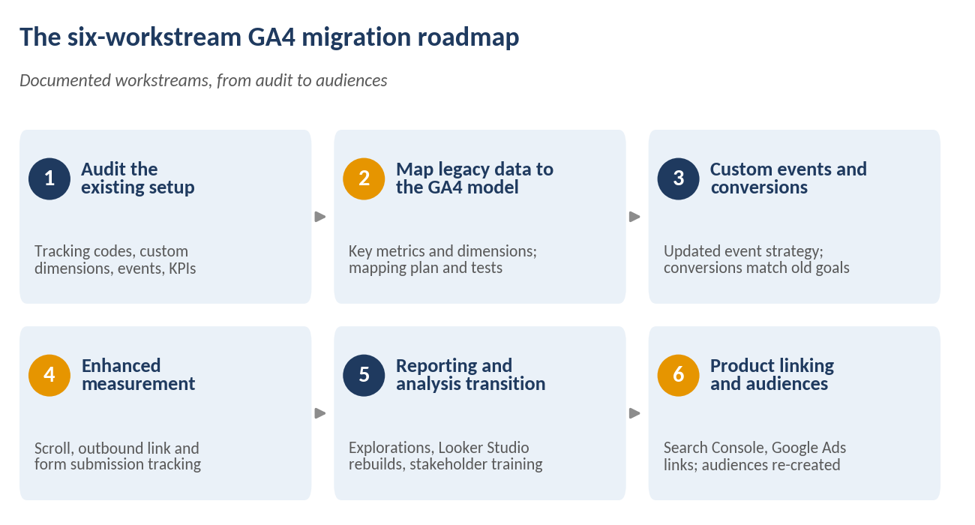
We worked through the migration as six distinct challenges, each with its own approach and solution. The table summarizes what was documented for each.
| Workstream | What we did |
|---|---|
| 1. Audit the existing setup | Audited the Universal Analytics implementation and built a detailed inventory of tracking codes (analytics and tag management platforms), custom dimensions and events. Documented the tracking structure, goals and KPIs, and mapped custom dimensions to Google Tag Manager data layer variables from the start. |
| 2. Map legacy data to the GA4 data model | Analyzed the data model differences, identified the key metrics, dimensions and data points to carry over, built a mapping plan, and tested the migrated data for accuracy and integrity. |
| 3. Custom events and conversions | Reviewed and updated the event tracking strategy for GA4, made the required changes to site code and tracking, and configured new GA4 conversions aligned with the previous goals. |
| 4. Enhanced measurement | Identified the key user journey touchpoints and implemented enhanced measurement features such as scroll, outbound link and form submission tracking, then tested and validated the setup. |
| 5. Reporting and analysis transition | Built a reporting migration plan, created custom exploration reports and dashboards in GA4, re-created Looker Studio reports, and trained stakeholders on the new reporting. |
| 6. Product linking and audiences | Logged every connected property (including Google Search Console and Google Ads) during the audit, imported the Google Ads links into GA4, and re-created Universal Analytics audiences with the GA4 migrator add-on for Google Sheets. |
MIGRATION READINESS
Is your Universal Analytics move really finished?
Check your own setup against the six workstreams: tracking, data mapping, conversions, reporting and linked products.
A problem we hit: custom dimensions zeroed out engagement metrics
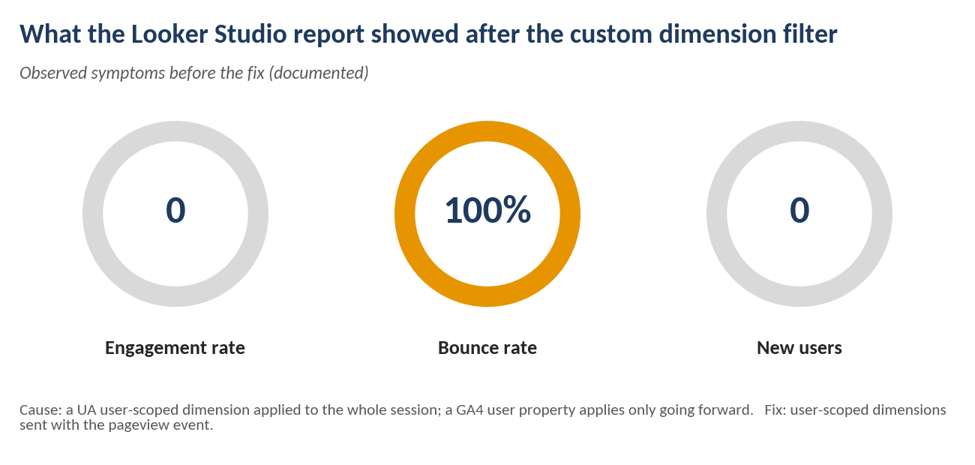
After configuring event-scoped custom dimensions, using them as filters in Looker Studio reports made the engagement metrics collapse: engagement rate showed 0, bounce rate showed 100% and new users showed 0. The cause is a difference in how the two platforms scope data. In Universal Analytics, a user-scoped custom dimension set mid-session was applied to every event in that session, including earlier ones. In GA4, a user property applies only from the moment it is set going forward.
The fix (documented): because session-scoped custom dimensions were not available in GA4 at the time, we created a user-scoped custom dimension for each one we needed and sent it with the pageview event.
Dashboard health check: Do your Looker Studio numbers add up?
- Engagement rate and bounce rate look realistic.
- Custom dimensions tested as filters, not only in GA4.
- New users and conversions match what you expect.
How to read the sections that follow. Each section carries a tag. Campaign evidence means activities and results documented in this engagement. Industry context and recommended practice are general guidance from Digital Success; they were not measured in this campaign and are not results. Illustrative examples are labeled as such and are not client data.
Why GA4 Migration Is More Than a Tag Swap
CAMPAIGN EVIDENCE + INDUSTRY CONTEXT
A GA4 migration is a re-measurement project, not a copy of Universal Analytics tags. GA4 records interactions as events, has no Universal Analytics-style views, and does not carry Universal Analytics goals across directly. Google stopped standard Universal Analytics properties from processing data on July 1, 2023, so any setup that mattered had to be rebuilt in GA4 rather than inherited.
That is why this engagement started with an inventory and a mapping plan rather than with tags. The documented workstreams, an audit, a data model mapping, custom event and conversion rebuilds, and a reporting plan, treat the migration as a design problem. The custom dimension issue above is a concrete example: a tag-for-tag copy would have looked complete and still produced broken engagement numbers in reports.
How Buyers Search for GA4 Migration and Reporting Services
INDUSTRY CONTEXT + ILLUSTRATIVE EXAMPLES (NOT DIGITAL SUCCESS'S REPORTED KEYWORD DATA)
Teams looking for help usually search at a particular stage of the migration. The formats below are illustrative; the target terms for this page are Google Analytics 4 migration services, GA4 reporting services and GA4 migration services.
| Stage | Illustrative query format | What the team needs | Page that should answer |
|---|---|---|---|
| Planning | “GA4 migration checklist”, “how to migrate to GA4” | A scoped plan and inventory | Guides and planning templates |
| Vendor search | “Google Analytics 4 migration services”, “GA4 migration services” | A partner who can run the project | Service page and case studies |
| Technical problem | “GA4 custom dimensions not showing”, “GA4 engagement rate 0” | A specific fix | Troubleshooting articles |
| Reporting | “GA4 reporting services”, “GA4 Looker Studio dashboard” | Dashboards stakeholders will use | Reporting service page, examples |
| Validation | “GA4 data accuracy”, “compare UA and GA4 data” | Confidence in the numbers | Validation guides and case studies |
This case study speaks most directly to the vendor search and technical problem stages: it names the migration steps and documents a specific, searchable problem and its fix.
Not sure what your GA4 setup is missing?
Get a review of your current tracking, custom dimensions and reports before gaps turn into bad data.
Beyond Migration: Measuring GA4 Implementation Quality
CAMPAIGN EVIDENCE + RECOMMENDED PRACTICE
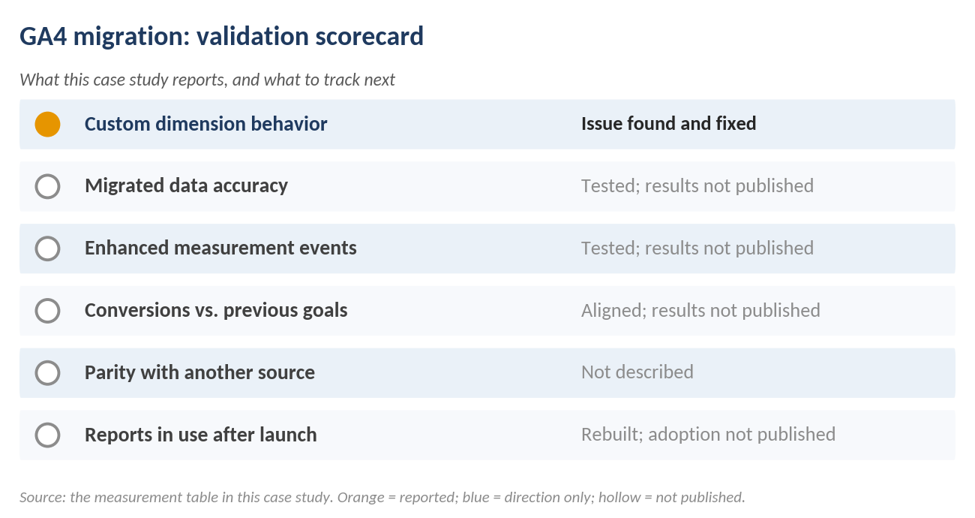
The documented work includes testing the migrated data for accuracy and integrity and testing the enhanced measurement setup. The case study does not publish validation results. The table separates what is documented from what a rigorous GA4 implementation would normally report.
| What to validate | Documented in this engagement | Reported results |
|---|---|---|
| Migrated data accuracy | Tested for accuracy and integrity | Not published |
| Enhanced measurement events | Tested and validated | Not published |
| Conversions vs. previous goals | New conversions aligned with the previous goals | Not published |
| Custom dimension behavior | Issue found and fixed with user-scoped dimensions | Documented (see above) |
| Parity with another source | Not described | Not published |
| Reports in use after launch | Reports rebuilt and stakeholders trained | Not published |
Other agencies' published GA4 case studies often include a parity check against a second analytics source or a data-loss figure. Whether this engagement ran such a check is not stated. If the data exists, adding it would make this case study more complete.
GA4 Reporting Services: Rebuilding the Reports Teams Actually Use
CAMPAIGN EVIDENCE + RECOMMENDED PRACTICE
Documented: the team built a reporting migration plan, created custom exploration reports and dashboards in GA4, re-created Looker Studio reports, and trained stakeholders on the new reporting.
Recommended practice for any GA4 reporting migration:
- Inventory reports by audience before rebuilding, so you migrate the reports people use and retire the rest.
- Write down metric definitions. GA4 reports engagement rate, which is the inverse of bounce rate, so stakeholders used to Universal Analytics bounce rate need a short explanation.
- Test dimensions in the reporting tool, not only in GA4. The Looker Studio issue above only appeared when a custom dimension was used as a filter.
- Train the people who read the dashboards, not just the people who built them.
Need GA4 reports your team will actually use?
Tell us which dashboards matter to your stakeholders and we will plan how to rebuild them in GA4 and Looker Studio.
What Other Teams Can Learn From This Migration
CAMPAIGN EVIDENCE, THEN RECOMMENDED APPLICATION
| Lesson | What happened here (documented) | How to apply it (recommended) |
|---|---|---|
| Audit before you build | Tracking codes, custom dimensions, events, goals and KPIs were inventoried first | Keep the inventory as a living document, and use it to sign off the migration |
| Map data, not just tags | A mapping plan aligned Universal Analytics data to the GA4 data model | Mark each metric as carried over, changed or retired |
| Test the whole reporting path | Custom dimensions broke engagement metrics in Looker Studio | Test every custom dimension in each report before launch |
| Plan the connections | Google Search Console, Google Ads links and audiences were logged during the audit | Re-link and re-create these early, so campaigns do not lose audiences |
| Prepare the people | Stakeholders were trained on the new reports | Schedule training before the old reports are retired |
Key takeaways for GA4 migration
- Start with an inventory. Tracking codes, custom dimensions, events and KPIs shaped every later step.
- Scope matters. GA4 handles custom dimension scope differently from Universal Analytics, and the difference surfaced in reporting.
- Plan reporting from day one. Explorations, Looker Studio reports and stakeholder training were part of the migration, not an afterthought.
What This Case Study Does and Does Not Establish
This page documents what Digital Success did and the work described above. It is not a controlled experiment, and some questions cannot be answered without data that was not published.
What the documented work supports
- The migration was organized into six workstreams, from tracking audit to product links and audiences.
- A specific GA4 reporting problem, custom dimensions zeroing out engagement metrics in Looker Studio, was identified and solved with user-scoped custom dimensions.
- The approach covers the main areas of a complex migration: tracking, data mapping, conversions, enhanced measurement, reporting and connected products.
What it does not establish without additional data
- Data accuracy or parity between Universal Analytics and GA4. Testing is documented but results are not.
- Time taken, project cost or business impact of the migration.
- Whether the framework works the same way for other sites. The client was a single restaurant and hotel aggregator.
- That the fix for custom dimensions still applies unchanged. It reflects the GA4 feature set at the time of the engagement.
Frequently asked questions
A GA4 migration moves a business's analytics from Universal Analytics to Google Analytics 4. Because GA4 uses an event-based data model, it means re-planning tracking, conversions, custom dimensions, reports and connected products, not copying tags.
The team audited the existing Universal Analytics setup, mapped it to the GA4 data model, rebuilt custom events and conversions, configured enhanced measurement, recreated reports and Looker Studio dashboards, and re-linked products and audiences.
After event-scoped custom dimensions were used as filters in Looker Studio, engagement rate showed 0, bounce rate 100% and new users 0. Because session-scoped dimensions were not available in GA4 at the time, the team created user-scoped custom dimensions and sent them with the pageview event.
No. It documents the approach, the problem encountered and the fix. Data accuracy comparisons, time saved and reporting adoption figures were not published.
Need a GA4 migration or GA4 reporting set up properly?
Our analytics team will review your current tracking and show you what needs to move.
Talk to our GA4 team Call +1-855-344-4821