
Paid Media PPC
High PPC Costs and Low Conversion Rates: How to Find the Real Cause of Expensive Leads
1. Why Are Your PPC Clicks Expensive but Your Leads Still Cost Too Much? Paying more for every click does not automatically mean a Google...



In today’s digital landscape, attracting local customers requires a strong online presence and a focus on local SEO services. One often-overlooked yet powerful tool is Bing Places for Business. This free service from Microsoft allows you to claim your business listing, ensuring accurate information and improved search engine visibility. By following these steps on how to set up your listing on Bing Places, you can connect with potential customers searching for local businesses like yours and take control of your online presence.
Bing Places for Business is a free online local business directory tool provided by Microsoft’s Bing search engine. It allows businesses to create and manage their listings, making it easier for potential customers to find them when searching online. By listing your business on Bing Places, you increase your visibility and reach local customers.
In the competitive world of local SEO services, claiming your spot on major search engines is a must. But what about Bing, the often-underrated search engine with a surprisingly high market share? Let’s explore the benefits of using Bing Places for Local SEO and how it can help your business thrive.
1. Increased Visibility: Listing your business on Bing Places improves your chances of being found by local customers. Bing is still the second-largest search engine globally, with a 10.51% market share. When potential customers search for products or services related to your business, having a presence on Bing increases your visibility.
2. Free to Use: Unlike some other advertising platforms, Bing Places for Business is entirely free. You can enhance your online presence without any financial investment.
3. Easy Setup and Management: Bing Places integrates seamlessly with other Microsoft products, such as Bing Maps. Creating and managing your business listing is straightforward, ensuring consistent and accurate information across different platforms.
4. Local SEO Boost: Bing Places helps with local search engine optimization (SEO). When users search for businesses in their area, Bing prioritizes local results. By having an active Bing Places listing, you improve your chances of appearing in local search results.
5. Additional Exposure: Bing Places listings often appear in Bing’s search results, maps, and other relevant sections. This visibility can result in increased website visits, phone inquiries, and foot traffic to your physical location.
6. Rich Business Information: You can provide detailed information about your business, including hours of operation, contact details, website links, and photos. This helps potential customers in gaining further insight into your products or services.
7. Customer Reviews: Bing Places allows customers to leave reviews. Favorable reviews can enhance your credibility and draw in a larger customer base.
Remember to keep your business information accurate and up-to-date on Bing Places to maximize the benefits of being listed!
By using Bing Places for Business, you can take advantage of a powerful tool to complement your overall local SEO services and reach a wider audience of potential customers in your area.
Follow these steps to get your business listed on Bing Places:
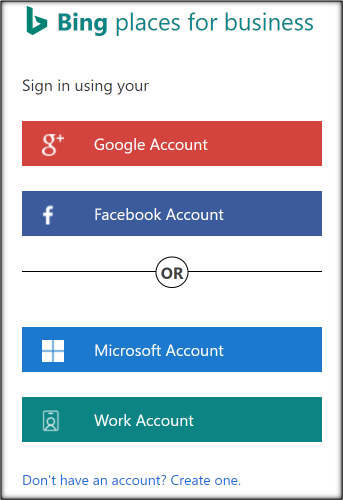
1. Log in to Bing Places for Business:
2. Create or Claim Your Business Listing:
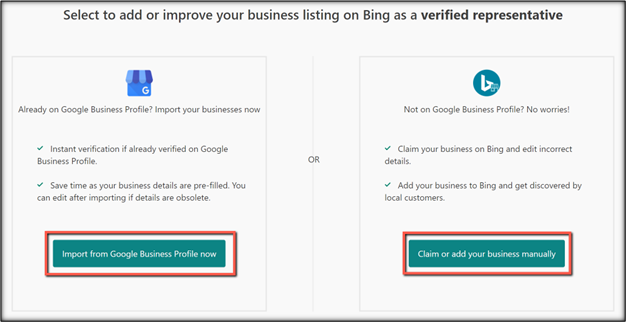
You can create your business listing in two ways:
3. Search for Your Business:
4. Claim Your Business:
5. Verify Your Business:
6. Complete Your Profile:

Get in touch with our team of experts to discuss SEO, SEM and Paid Marketing solutions. Get a free SEO/PPC/Content Audit!
Bing Places for Business is a free tool that empowers local businesses to claim and manage their online presence on Bing. Here’s how it works:
1. Listing Creation
2. Verification
3. Profile Completion
4. Visibility and Search Results
5. Customer Interaction
In summary, Bing Places for Business is a valuable tool for local businesses to leverage within their local SEO strategy. It empowers businesses to connect with their target audience by providing accurate information and improving local search engine visibility.
Conclusion
Setting up your business listing on Bing Places for Business is a straightforward process that can significantly improve your local visibility. Take advantage of this free tool to connect with potential customers and enhance your online presence. For a more comprehensive local SEO strategy, consult with our SEO experts to explore additional tactics that can help you dominate local search results. Remember to keep your business information accurate and up-to-date to maximize the benefits of being listed on Bing Places!
1. Why Are Your PPC Clicks Expensive but Your Leads Still Cost Too Much? Paying more for every click does not automatically mean a Google...
Paid advertising becomes difficult to manage when the numbers in a dashboard do not clearly explain what is happening. Click costs may rise, campaign results...
Introduction: Before You Optimize Your Ads, Make Sure You Are Measuring the Right Things A Google Ads campaign can report zero conversions while the sales...
Introduction: A Good ROAS Number Does Not Automatically Mean a Profitable Campaign A paid advertising campaign can report impressive revenue, maintain a seemingly healthy return...
Your Google Ads Budget May Be Working Hard Without Producing Enough Business When Google Ads costs rise but qualified leads and sales do not keep...
A plumbing company can receive 50 leads from one marketing channel and 20 from another, yet the smaller channel may generate more profitable jobs. The...